ReadMore is a Chrome extension for reading PDFs and EPUBs with highlights, notes and read aloud. Connect your own storage to carry your library and reading position between computers.
Built for Chromium browsers - Chrome, Edge, Brave & more
Free for up to 10 books, with cross-device sync through your own Google Drive or Dropbox included. Go Pro for unlimited books, PDF notes export and self-hosted sync. No account needed to start reading.
deep-work-notes.pdfp. 147 saved
Chapter 4 - Methods
Synced everywhere
Thesis
To read
One book. Every machine. Zero effort.
Keep scrolling - this is what tonight and tomorrow morning look like with ReadMore.
Your desktop · 11:42 pmYour laptop · 8:15 am
the-brothers-karamazov.epub
147
of 912 pages
Position savedOpening your library…Right where you left off
11:42 pm · desktop
You finish page 147 of a 912-page epic and close the tab without a second thought. Your place is already saved.
8:15 am · laptop
Coffee in hand, different machine. You open your library and click the same book.
8:15 am · one second later
It opens on page 147. No scrolling, no searching, no “where was I?”. ReadMore quietly kept your place.
That's it. That's the magic.
Where are my books saved?
On your own device, or in your own cloud account. Never on our side - we can't even see them.
The ReadMore extension
Shows your PDFs & EPUBs and remembers your page
Your books
Bookmarks & labels
Reading position
Local storage
Saved on this computer
Your books stay in this browser, on this device. Nothing is uploaded anywhere, no sync - just this machine.
Cloud storage
Saved in your own cloud
Your books go into a folder in your Google Drive or Dropbox account - free or paid, up to your plan's book limit. Self-hosted WebDAV servers are a Pro feature.
Google DriveDropboxSelf-hosted (Pro)
Simple version: your books are only ever on your device or in your cloud account. No ReadMore account is ever needed, and we never receive a copy - on the free plan or the paid one.
Where do my files actually go?
The literal folder, the exact permission, and the off switch - not a marketing summary.
Google Drive
My Drive/ReadMore/
Uses the drive.file OAuth scope - Google's most restricted Drive scope. ReadMore can only see files it created itself, never the rest of your Drive.
Dropbox
Apps/ReadMore Library/
Scoped to its own App Folder by Dropbox's own permission system. ReadMore cannot see any other file in your Dropbox account.
Self-hosted (WebDAV) - Pro
a folder on your own server
Synology, Nextcloud, TrueNAS, or anything that speaks WebDAV. Your server address and credentials are typed once and go straight to your server - never through us.
ReadMore uses website access to fetch PDFs you open and capture PDF links in its reader. It does not inject a content script into ordinary web pages. Turning PDF capture off in Options stops automatic capture; it does not revoke the extension's declared website permissions.
Everything a serious reader needs
A full reading environment for PDF and EPUB, living right inside your browser.
The reader
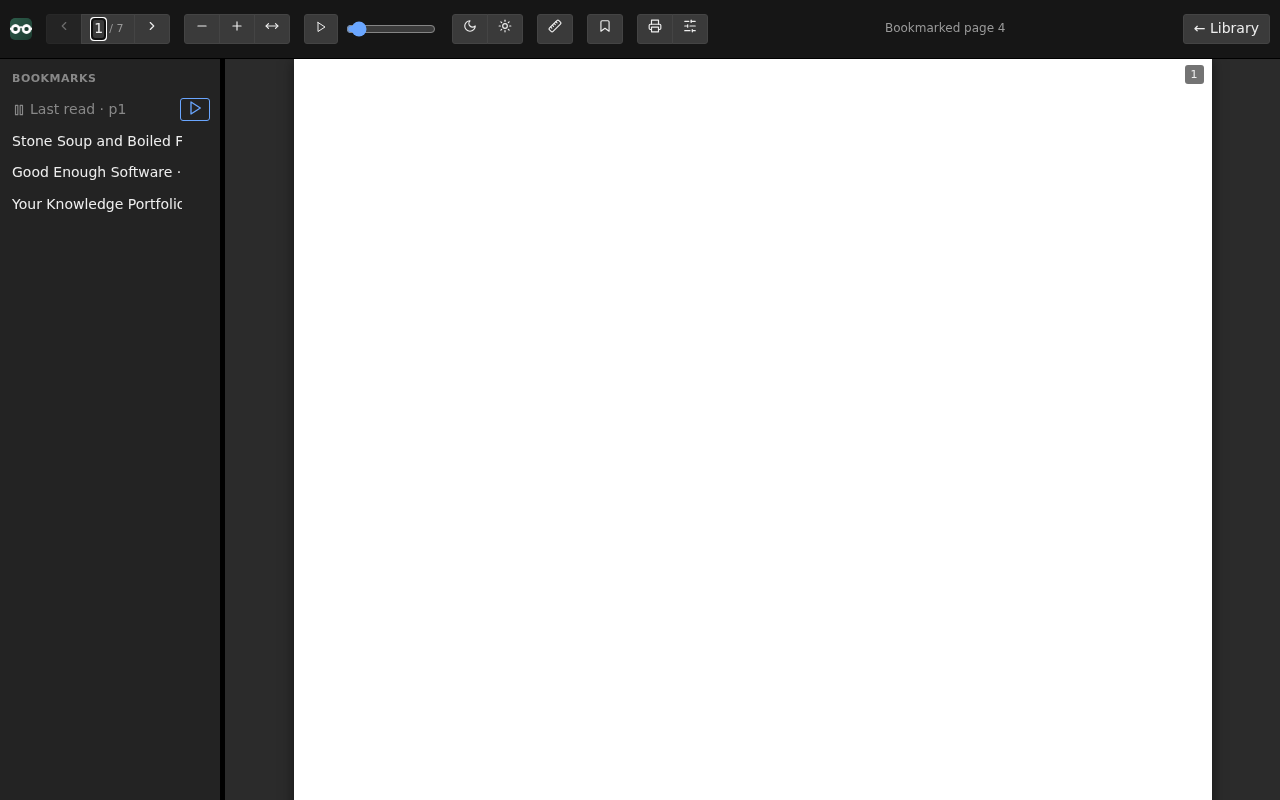
A viewer that feels like paper
Continuous scroll, crisp rendering, and controls designed for long sessions - not quick glances.
Night mode and warm paper mode - stack them as you like
Brightness control and a reading ruler that follows your zoom
Hands-free auto-scroll with adjustable speed
Read aloud for PDF and EPUB, with browser voices or downloadable on-device voices
Zoom, fit-to-width, fit-to-height - all keyboard-friendly
Fill in PDF forms - click a field and type, or write anywhere on a page that has none
Sign with your mouse, finger or stylus, or type your name in a handwriting style
Ink colour, text size and pen width sit in a bar that appears with the tool and goes away with it
Save over the original or save a copy, and print what you filled in
ReadMore viewer
The library
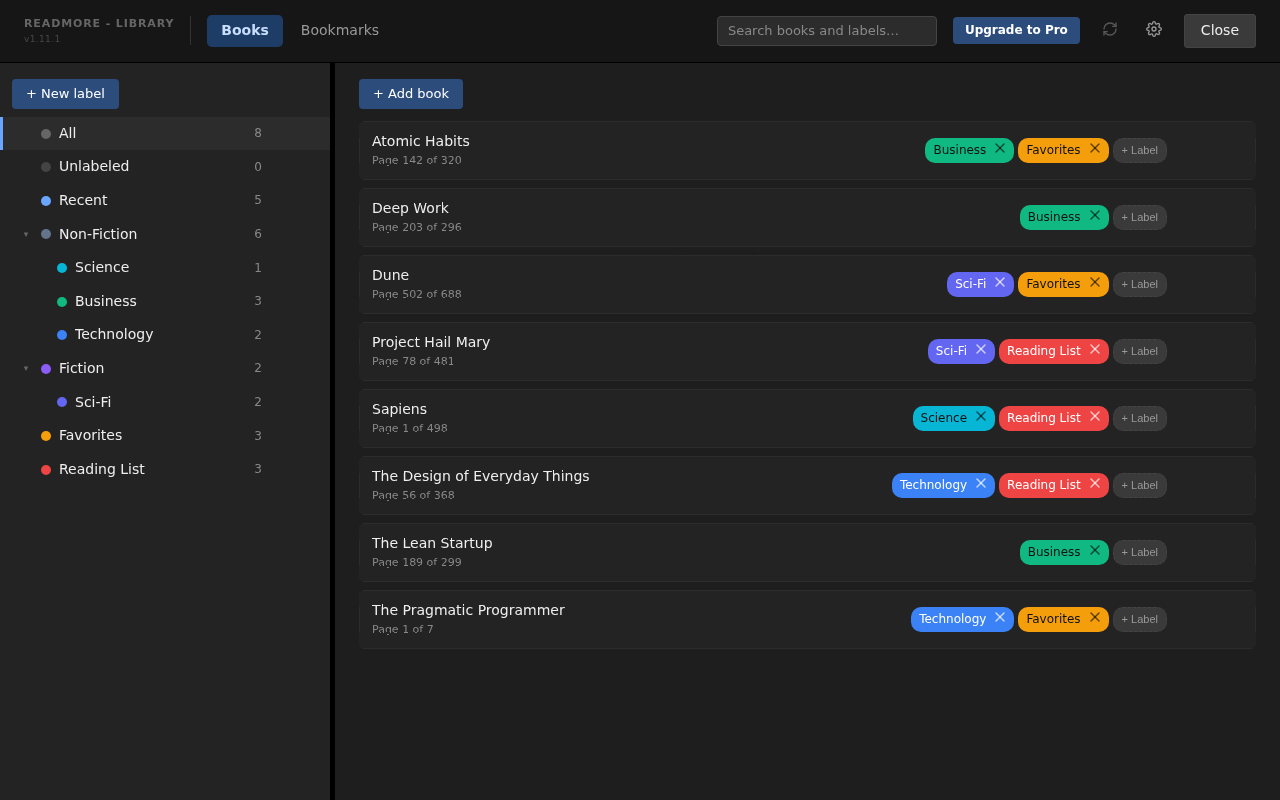
A library that organises itself
Every book you add lands in one calm, searchable place - with your reading progress right on the shelf.
See your books as a list or as a grid of covers, drawn from each book's own pages
Colour-coded labels with nesting - build your own shelves
Search books, bookmarks, highlights and their notes across your collection
Recents, duplicate detection, and one-click rename
Download a library backup and restore your books, notes, highlights and reading data
ReadMore library
Bookmarks
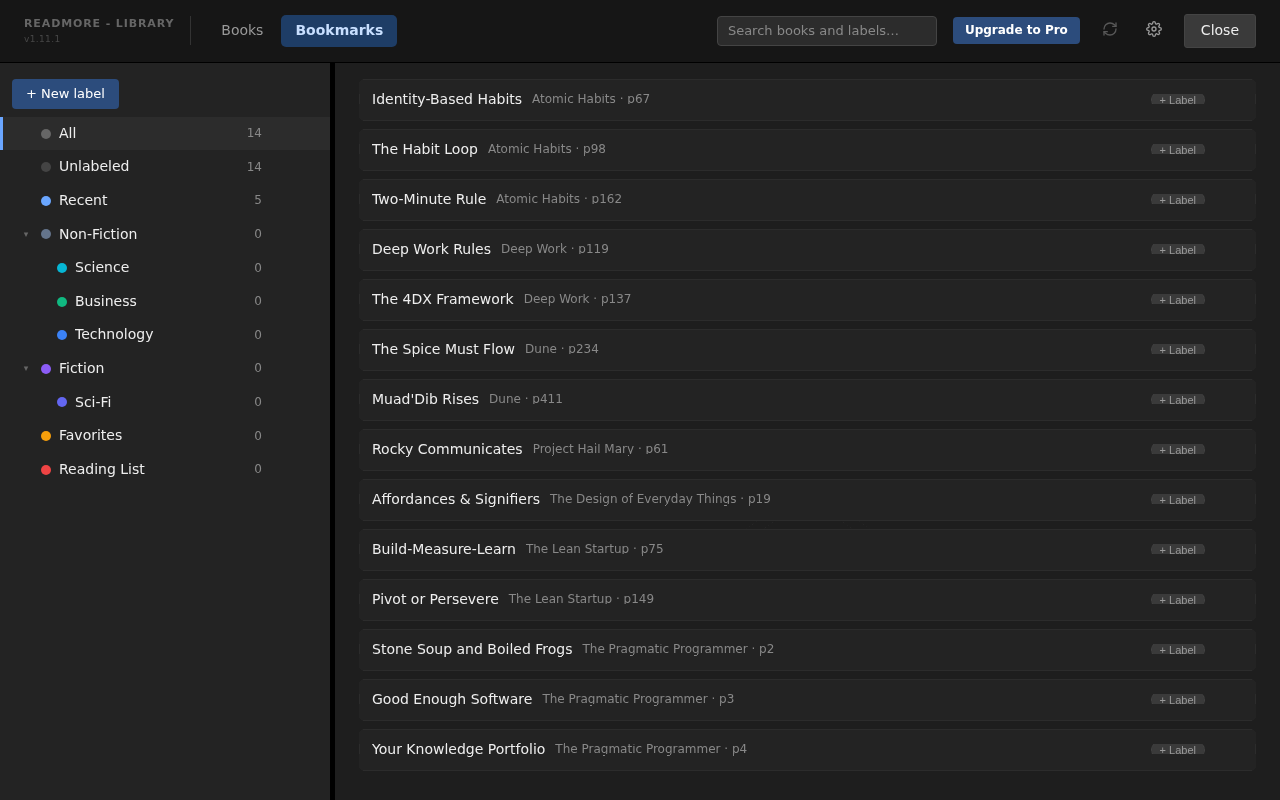
Bookmarks that mean something
Name the moments that matter - a key argument, a formula, the start of chapter twelve - and jump back in one click, from any book, on any machine.
Named bookmarks in every book
Highlight text in 5 colours, label it, or turn it into a bookmark
Write rich-text notes on bookmarks and highlights, included free
A cross-book bookmarks and highlights view for your whole library
Pro: export notes from PDF books, or collect them across books by label
Your last-read position is tracked automatically
Bookmarks across your library
Your space
Make it entirely yours
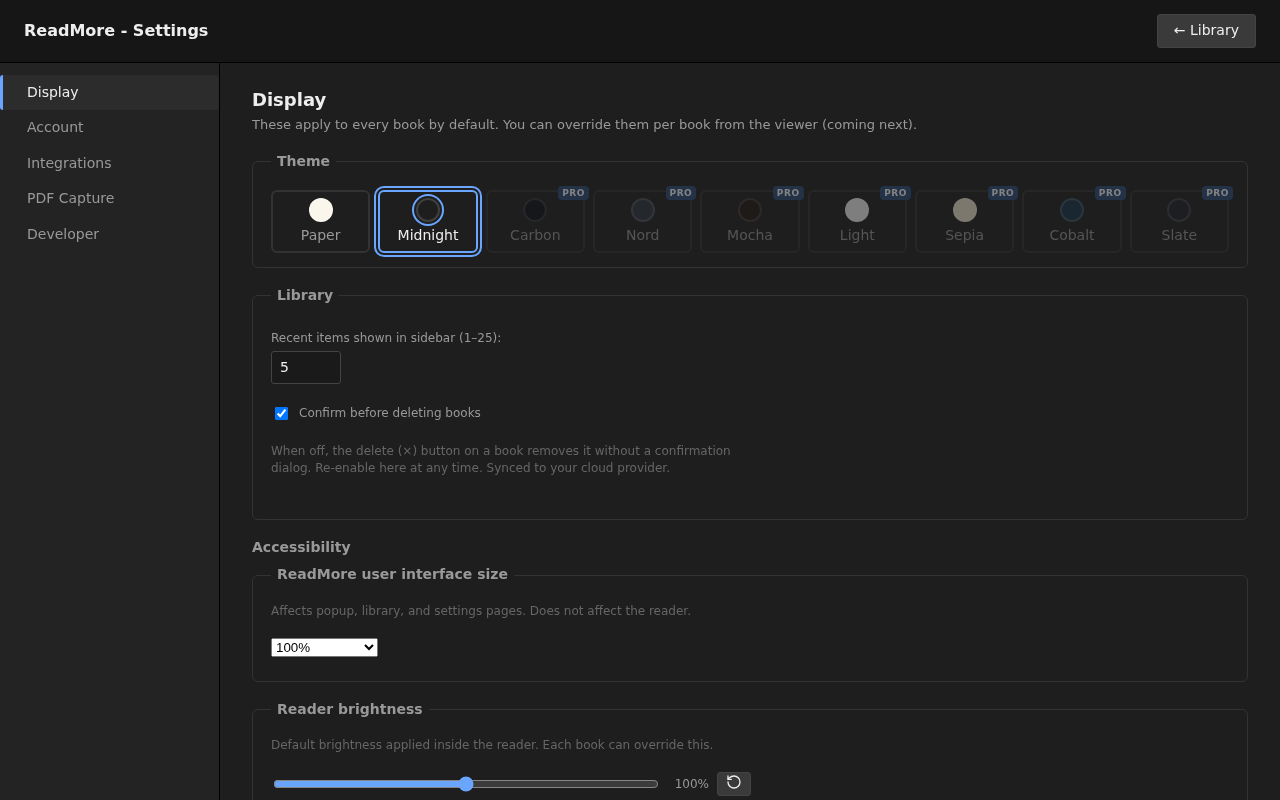
Nine hand-tuned themes and per-book settings, so your midnight thriller and your morning textbook can each look exactly right.
9 themes, from warm Paper to deep Midnight
Per-book overrides for theme, zoom, ruler and more
Interface scaling for comfortable reading at any size
Fits every screen - the layout adapts from wide desktop down to phone-sized windows
Theme settings
Nine moods. One reader.
Scroll - or tap a theme - to try them on.
Paper
Paper and Midnight are free. All nine come with Pro.
Private by design
Your books never touch our hands.
Your library lives in storage you control - your own Google Drive, Dropbox, or a server you host yourself - or entirely on your device if you prefer. We can't read your books, and we wouldn't want to.
Your storage, your rules
Books, bookmarks and reading positions sync through your own cloud account or NAS. Keep a downloadable backup and manage your own files.
No tracking. None.
The extension has no reading analytics or automatic crash reporting. Bug reports are sent only when you choose to submit them.
No reading account required
Start reading locally without signing up. Pro uses an emailed licence key; cloud sync uses the storage account you choose to connect.
Compatibility and limits to check before you install or upgrade.
Notes export supports PDF books
Pro exports annotated pages and notes as a PDF, from one book or grouped across books by label. EPUB notes can be saved and synced, but EPUB books are not included in this export.
No mobile app
There is no standalone iOS or Android app. Use a desktop Chromium browser that supports Chrome Web Store extensions.
Chromium only
Chrome, Edge, Brave, Vivaldi and other Chromium browsers. No Firefox or Safari extension exists.
Some sites refuse the PDF fetch
A handful of hosts' CDNs or firewalls block the request that pulls a captured PDF into the viewer. We're mapping which ones and why; the extension has a way to report one when it happens.
Pro and Lifetime support up to 5 active devices per licence.
Not sure which plan fits, or have a question?
Get in touch.
Questions, answered
Which browsers does ReadMore work in?
Desktop Chromium browsers that support Chrome Web Store extensions, including Chrome, Edge, Brave and Vivaldi. Google Drive sign-in depends on Chrome's identity support; on Edge, use Dropbox or local storage. There is no Firefox or Safari extension.
Where are my books actually stored?
In storage you control. By default, books live in your browser on your device - or connect your own Google Drive or Dropbox (free, no upgrade needed) and ReadMore keeps its own tidy folder there instead. A self-hosted WebDAV server is a Pro option, for people who would rather nothing lives on someone else's cloud. We never receive or store your books.
Does it work offline?
Local books and cloud books still in your device's cache can be read offline. Open a cloud book before going offline, and keep a backup of anything important. Sync and any first-time voice download need a connection; some browser voices also use a network service.
What file formats are supported?
PDF and EPUB - the two formats that cover nearly every ebook, paper, textbook and report. Both get the full treatment: bookmarks, labels, position tracking and themes.
How does Pro activation work?
After checkout, your licence key arrives by email within moments. Paste it into the extension's options page and you're done. No account creation, no passwords.
What happens to my books if I stop paying?
Nothing dramatic. Your books and reading data stay in your own storage - they're yours. The extension simply returns to the free plan's limits, and everything you already saved remains readable.
Why does it ask to read and change data on all websites?
ReadMore uses website access to fetch PDFs you open and capture PDF links in its reader, where your position can be saved. It does not inject a content script into ordinary web pages. PDF capture can be switched off in Options; that stops automatic capture but does not remove the extension's declared website permissions.
Is there a mobile app?
There is no standalone iOS or Android app. The extension is designed for desktop Chromium browsers; a narrow layout alone does not make it installable in mobile Chrome or Safari.
Can I highlight and annotate?
Yes. Highlight in five colours and add rich-text notes to bookmarks and highlights in PDF and EPUB books, included free. On a PDF you can also write, draw and sign directly on the page, in any colour from the same palette used everywhere else, and save the result as a real PDF anyone can open. Pro can export annotated pages and notes from PDF books, including collections grouped by label across books. EPUB books are excluded from notes export.
What is your refund policy?
If you bought a licence but haven't activated it yet, email us within 14 days of purchase and we'll refund you in full. Once a key is delivered and usable you've consented at checkout to that immediate delivery, which under EU/UK law is what waives the 14-day right of withdrawal - but if ReadMore doesn't work as described and we can't fix it, you're still entitled to a refund. Full detail in our Terms of Service; either way, email support@tipahaus.com and we'll sort it out.
Your next page is waiting.
Open a book, mark what matters, and pick up where you left off.